
NUS-ID Password Reset
Reset your NUS-ID password conveniently and securely via smartphone.
To start using this service, ensure that your mobile number is registered in myISIS or myNUS Staff Portal. You will receive SMS verification via your registered mobile number.
Important: If your mobile number is not registered properly, you are unable to make use of this service to reset your NUS-ID password. Please set up your mobile number when you are logged in to myISIS or myNUS Staff Portal.
Pre-requisite – Ensure your mobile number is registered
For Staff
• o Login to myNUS StaffPortal with your NUS-ID.
• o Navigate through eServices > More > my Contact > Update address & contact, and add or make changes to your mobile number.
For Student
• o Login to MyEduRec with your NUS-ID.
• o Navigate through Self Service > Campus Personal Information > Phone Numbers, and add or make changes to your local mobile number.
Step 1 – Submit the request
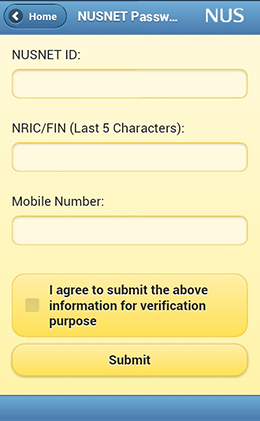
Click here to launch the application.
Fill in the information as required. Click on Submit.
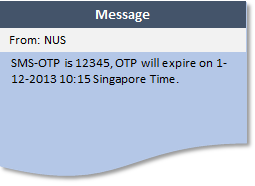
A One-Time-Password (OTP) will be sent to your mobile phone via SMS.
Step 2 – Retrieve the OTP
Step 3 – Enter the OTP
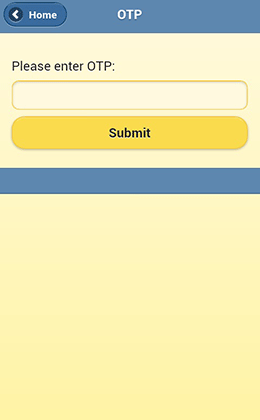
Enter the OTP on the app before it expires.
Step 4 –Receiving your new password
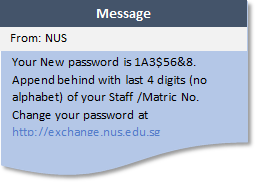
You will receive another SMS containing the first 8 characters of the new password within 1 – 2 minutes.
Append the last 4 numeric digits of your student or staff number to the end of the string to form your new password.
Note: Please change the temporary password immediately at http://exchange.nus.edu.sg.
Frequently Asked Questions
- I have submitted the request to reset my password but I have not received any SMS after some time.Please retry later. If the same happens, please contact IT Care at 6516 2080 or itcare@nus.edu.sg for further assistance.
- I encountered “We are not able to verify your information” after entering my particulars and click on Submit.There are a few possibilities for this scenario:
- Your mobile number is not found or registered in myISIS or myNUS Staff Portal.
- The NRIC/FIN number you entered is not registered in myISIS or myNUS Staff Portal.
Please contact IT Care at 6516 2080 or itcare@nus.edu.sg for further assistance.
