
nCloud – Cluster services
Cluster service allows you to create a pair of virtual load balancer that distributes network traffic across multiple Virtual Machine to achieve optimal resource utilizations. The IT administrator can create up to maximum of 4 Virtual Machines that link to 1 pair of load balancer.
The virtual network load balance supports Layer-4 of OSI model and accepts TCP, HTTP (port 80), or HTTPS (port 443) requests and will by default distribute route based on least traffic algorithm. The member Virtual Machines will automatically be deployed with a Private IP address. However, nCloud allows the IT administrator to choose whether they need an internet routable public Virtual IP or intranet Virtual IP.
Cluster Services can be broken down into 2 sub-categories for IT administrator to choose:
- ❖ Cluster Internet Services
- ❖ Cluster Intranet Services
Cluster Internet Services
For IT administrator that requires the Virtual Machine to communicate to the public internet world, you need to choose this service. Cluster Internet Services only support production Servers deployment. Below is the screenshot of this service in the nCloud portal:

Let us take for example we select “Win2016-Clus-Inter-Prod”. nCloud will automatically create 2 or more Windows member servers with clustering feature and it would be placed in a production network tagged to a public routable internet virtual IP.
Cluster Intranet Services
For IT administrator that requires the Virtual Machine to communicate internally within NUS network only, you may choose this service. Cluster Intranet Services support both production and development Servers deployment. Below is the screenshot of this service in the nCloud portal:
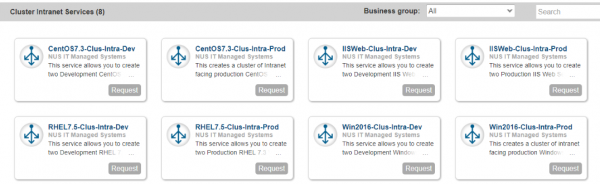
Let us take for example we select “Win2016-Clus-Intra-Dev”. nCloud will automatically create 2 or more Windows member servers with clustering feature and it would be placed in a development network tagged to only NUS routable intranet virtual IP.
