
SINGULARITY DYOI (DO YOUR OWN IMAGE)
The major crisis in research is reproducibility. How can one make sure to install the exact same software with its dependencies and ensure it produces the same output?
Although it sounds like a trivial question, many reports show that it is not very easy to achieve this and there exists a large number of research papers that cannot be reproduced. This reproducibility crisis is not limited to just biology or psychology; computational fields also suffer from this. One of the most popular ways to deal with instability and reproducibility is using containers.
One can easily “containerize” the pipeline and its complicated dependencies in this lvm (light virtual machine) can be able to reproduce your environment across different operating systems.
Docker is most widely used container in the software world but it has many limitations for HPC workloads like running cross-node MPI programs. Further, due to security reasons, docker is not well suited for shared HPC clusters.
The Singularity container overcomes the limitations of Docker as it is specifically designed for scientific use. Singularity is widely used in NUSIT-HPC, especially for deep learning and other GPU based applications. We have published a newsletter last year on how to use singularity on NUS-IT HPC.
One major limitation of singularity is that it requires an admin (sudo) account to build and create custom container images and not many users have access to an administrator environment. To address this issue, singularity offers a remote builder service to safely build containers in secure, isolated environments without the need for root access to that system.
Building Images using singularity remote builder
Setup sylabs account
From Singularity 3.0, user can build containers directly on the command line from NUSIT HPC cluster without uploading the recipe file to external repository. To begin using Singularity Remote Builder is to login to sylabs account here https://cloud.sylabs.io using your Google/Github/GitLab account and create a new token which generates a large string that will be read by Singularity on NUSIT-HPC.
Prepare singularity config
Create a new singularity folder (hidden) on your home directory and save your sylabs token inside it. You can follow the below commands

Now you can start building images using remote builder from atlas8 login node.

Example: GATK Pipeline
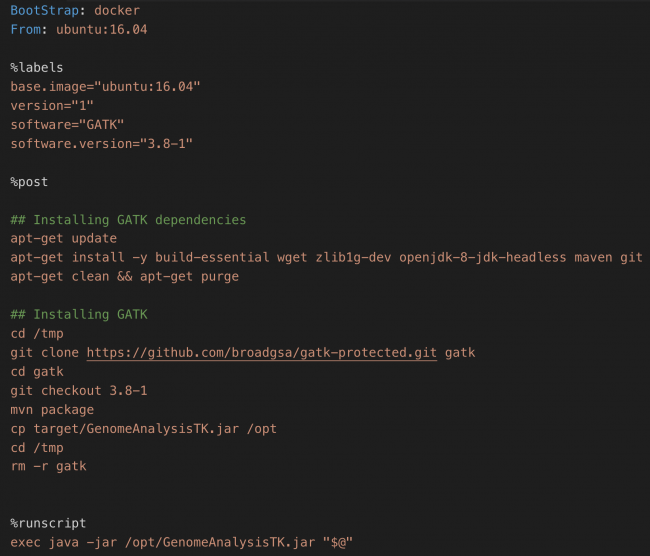
GATK is a genome analysis toolkit software for analyzing high throughput genomics data. Here we create a new image for GATK using remote builder. One must create a recipe file which contains the installation steps and other environment configurations.
We are using Ubuntu as a base image and install GATK on top of this base image. You can refer here (https://sylabs.io/guides/3.1/user-guide/definition_files.html) to know more on how to create a recipe file for Singularity. Below is the recipe file (gatk_recpie.def) we use to build GATK.
Build image using remote builder
Once the recipe file is ready, we can build the image using remote build command

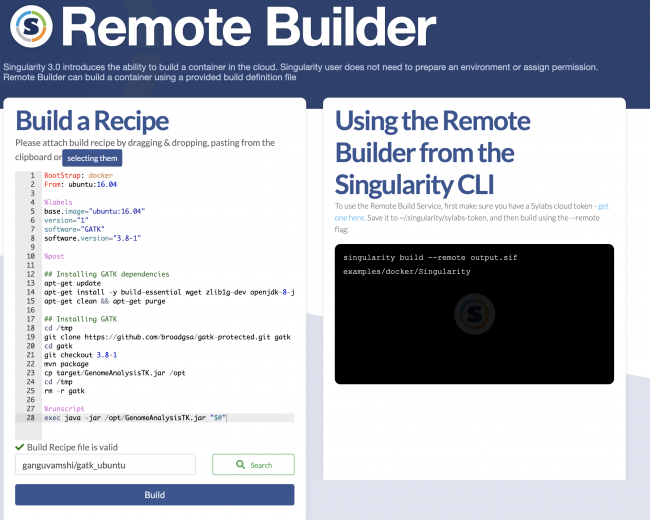
You can also build images directly on the sylabs cloud website by pasting the recipe file within the remote builder service.
Pulling images to HPC
All images built remotely can be saved as projects within your sylabs account and can pull them directly using singularity pull command as below
singularity pull gatk_ubuntu.sif library://ganguvamshi/gatk_ubuntu:latest
As explained in the example above, one can use singularity remote builder directly on HPC cluster to build custom images. Users can reach out to DataEngineering@nus.edu.sg for any further support on Singularity
